> ## Documentation Index
> Fetch the complete documentation index at: https://docs.ledgerbeam.com/llms.txt
> Use this file to discover all available pages before exploring further.
# Authentication
Start using Ledgerbeam's conversational analytics API in minutes. Create an account, get your API key, and begin querying your data with natural language.
## Sign Up for Free
Create your account on our [dashboard](https://app.ledgerbeam.com) to access all features. New accounts automatically receive free credits for testing and development.
## Set Up Your Workspace
After signing up, you'll be guided through creating your workspace. This is where you'll manage your API keys, connect your data sources, view usage analytics, and configure your integration settings.
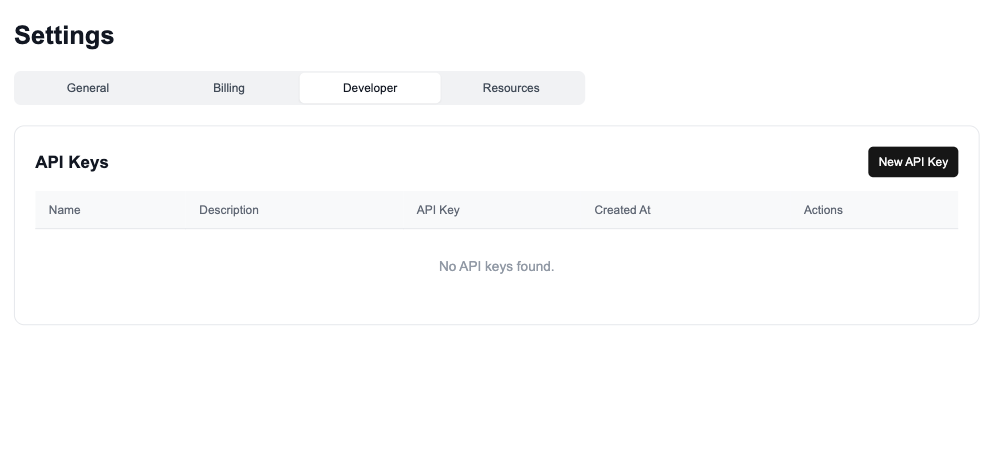 ## Get Your API Key
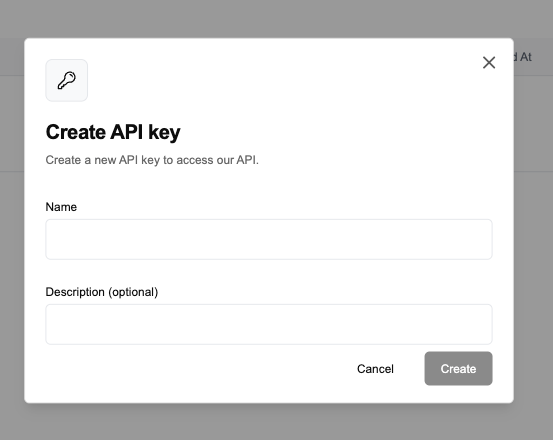
Create an API key for your workspace. You can find it in the [API Keys section](https://app.ledgerbeam.com/settings/developer) of your dashboard.
## Get Your API Key
Create an API key for your workspace. You can find it in the [API Keys section](https://app.ledgerbeam.com/settings/developer) of your dashboard.
 ### Using Your API Key
Include your API key in the `API-KEY` header of your requests:
```bash theme={null}
curl -X POST https://api.ledgerbeam.com/v1/chats/messages \
-H "API-KEY: YOUR_API_KEY" \
-H "Content-Type: application/json" \
-d '{
"resource_id": "your_resource_id",
"content": "What are my top customers this month?"
}'
```
## Security Best Practices
* **Keep your API key secure** - Never expose it in client-side code or public repositories
* **Use environment variables** - Store your API key in secure environment variables
* **Rotate keys regularly** - Generate new keys periodically for enhanced security
* **Monitor usage** - Check your dashboard regularly for unusual activity
* **Secure your data connections** - Use encrypted connections and store credentials securely
## Rate Limits
Account creation is free. Paid plans include higher limits and priority processing. Check your current plan in the [dashboard](https://app.ledgerbeam.com/settings/billing).
## Need Help?
* **Documentation**: Explore our [API reference](./api-reference/introduction) for detailed examples
* **Support**: Contact us at [support@ledgerbeam.com](mailto:support@ledgerbeam.com)
* **Community**: Join our [Discord](https://discord.gg/ledgerbeam) for developer discussions
### Using Your API Key
Include your API key in the `API-KEY` header of your requests:
```bash theme={null}
curl -X POST https://api.ledgerbeam.com/v1/chats/messages \
-H "API-KEY: YOUR_API_KEY" \
-H "Content-Type: application/json" \
-d '{
"resource_id": "your_resource_id",
"content": "What are my top customers this month?"
}'
```
## Security Best Practices
* **Keep your API key secure** - Never expose it in client-side code or public repositories
* **Use environment variables** - Store your API key in secure environment variables
* **Rotate keys regularly** - Generate new keys periodically for enhanced security
* **Monitor usage** - Check your dashboard regularly for unusual activity
* **Secure your data connections** - Use encrypted connections and store credentials securely
## Rate Limits
Account creation is free. Paid plans include higher limits and priority processing. Check your current plan in the [dashboard](https://app.ledgerbeam.com/settings/billing).
## Need Help?
* **Documentation**: Explore our [API reference](./api-reference/introduction) for detailed examples
* **Support**: Contact us at [support@ledgerbeam.com](mailto:support@ledgerbeam.com)
* **Community**: Join our [Discord](https://discord.gg/ledgerbeam) for developer discussions